Your API workspace is just a .http file.
A polished HTTP client that reads, writes, and runs the same plain-text format
your editor already understands. .http in, .http out.
Free and open source under MIT. No cloud account. No telemetry by default.
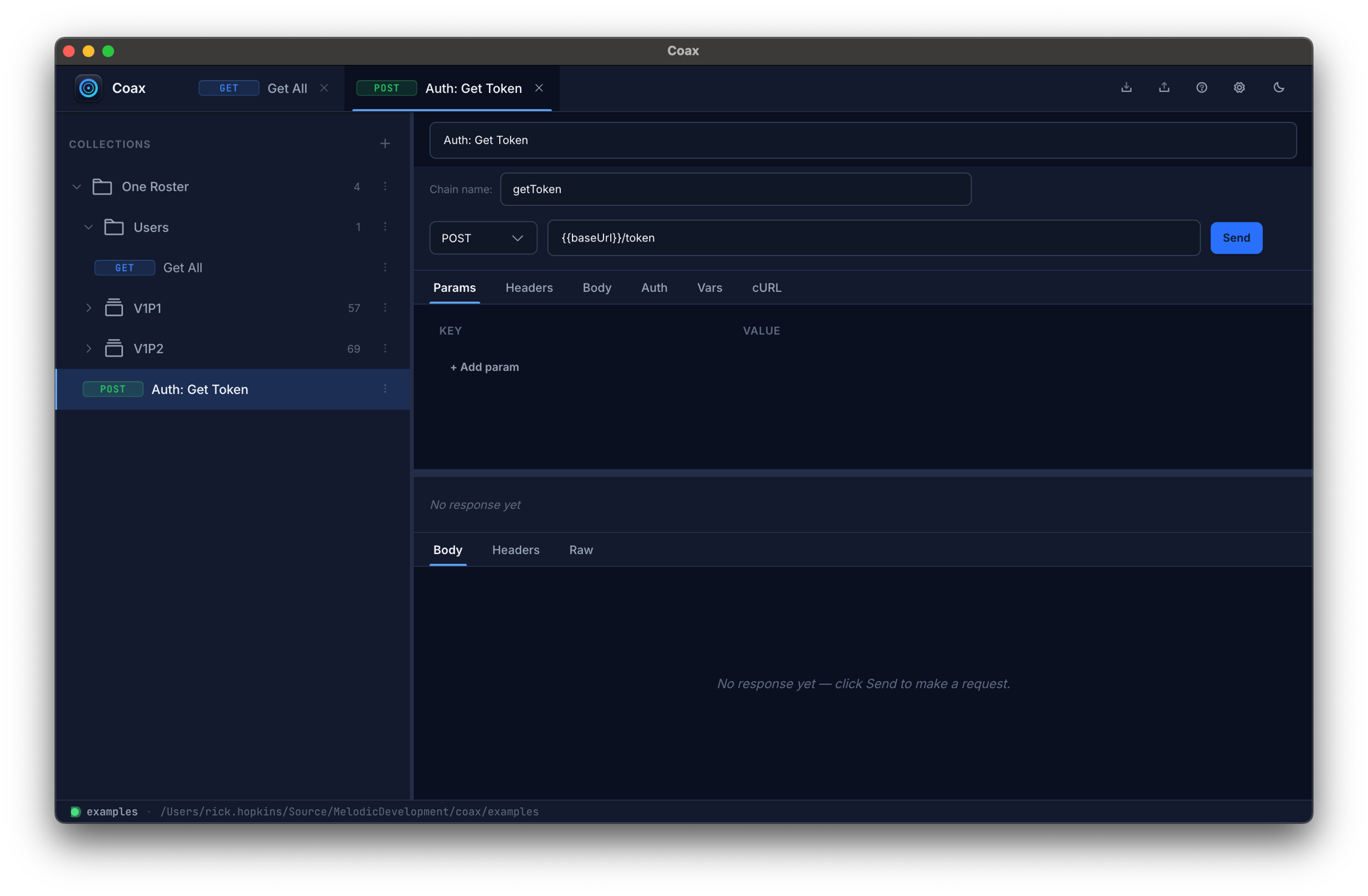
A workspace that reads like code, runs like code.
Postman and Insomnia store your work in their own cloud. Coax stores it in
.http files — the same format VS Code's REST Client and JetBrains
HTTP Client already use. That means it works with everything you already do.
Diff like code
Every change to a request is one line in git. Code review your API contract changes the same way you review code — no proprietary UI required.
Runs in CI
The same .http file you debugged in the app runs headless in your pipeline. Add # @test status == 200 and watch your assertions fail on the PR that broke them.
Your data stays put
No account. No cloud sync by default. Secrets are encrypted on disk with your OS keychain. Your endpoints, headers, and tokens never leave your laptop unless you tell them to.
Everything a senior dev expects.
Built by people who actually use API clients all day, on the boring details most tools get wrong.
Native .http
Open any .http file from VS Code REST Client or JetBrains HTTP Client. Round-trips on save — no proprietary format, no lock-in.
OpenAPI import
Paste a Swagger / OpenAPI URL or drop a file in. Tags become folders, operations become requests, the base URL becomes an environment variable.
Layered environments
Global → collection → folder → request. Deepest layer wins. Switch active env with one click; chain requests reference each other's responses via JSONPath.
Encrypted secrets
Mark a variable as secret and it's encrypted at rest with your OS keychain (macOS Keychain / DPAPI / libsecret). Export strips secrets to placeholders.
Monaco editor
The same code editor that ships in VS Code. JSON syntax highlighting, autocomplete, multi-cursor, the works — on both the request body and the response viewer.
CLI runner
coax run path/to.http headless. Inline assertions, JUnit output, exit codes your CI actually understands. Same .http file your team already edits.
Three things a screenshot tells better than a sentence.
No staged mockups. These are the real app, doing the real work.
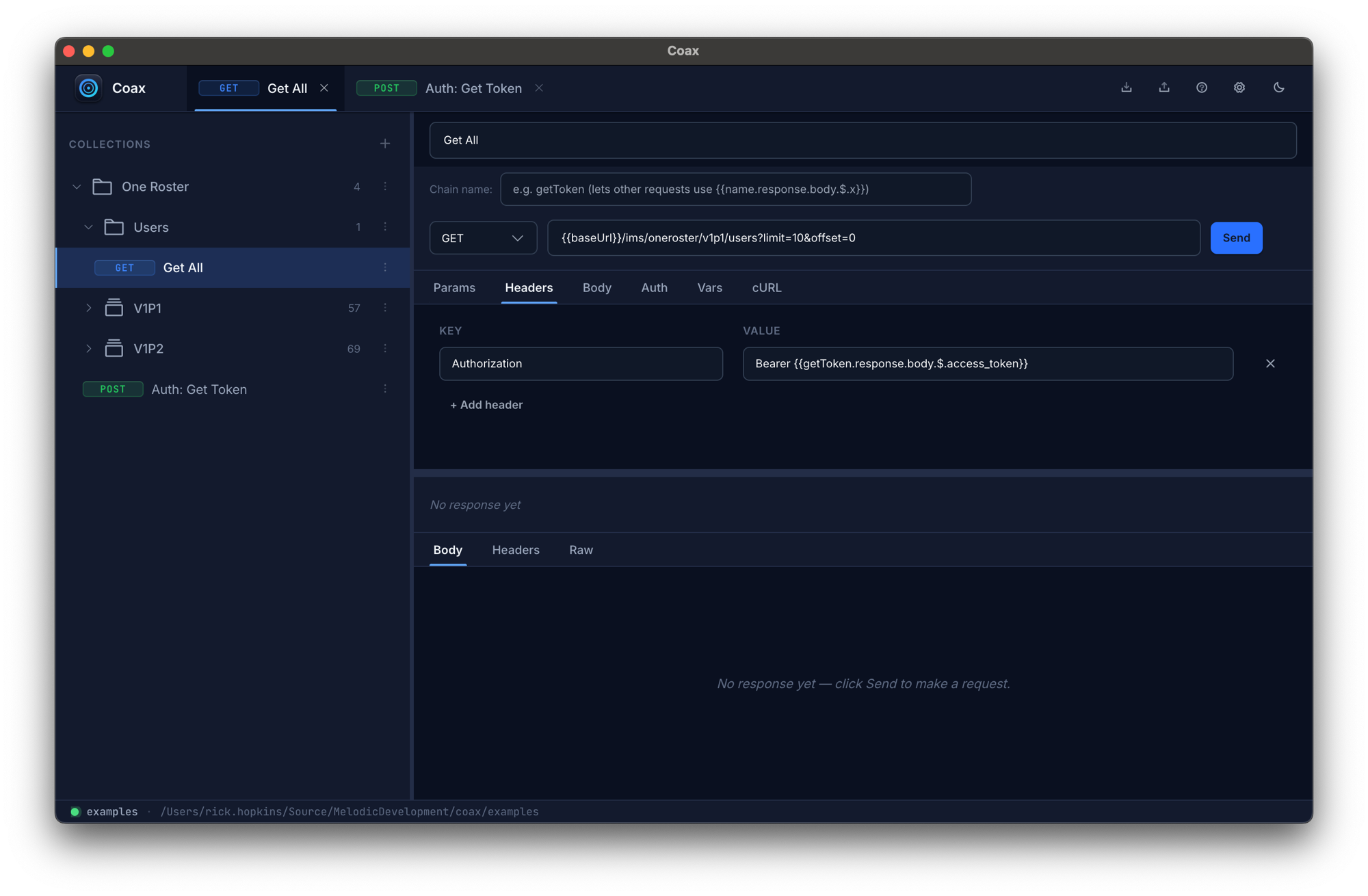
Reference last responses inline
Pull a token, ID, or any JSON field out of one request and drop it into the
next via {{name.response.body.$.field}}. No glue scripts, no
copy-paste rituals between tabs.
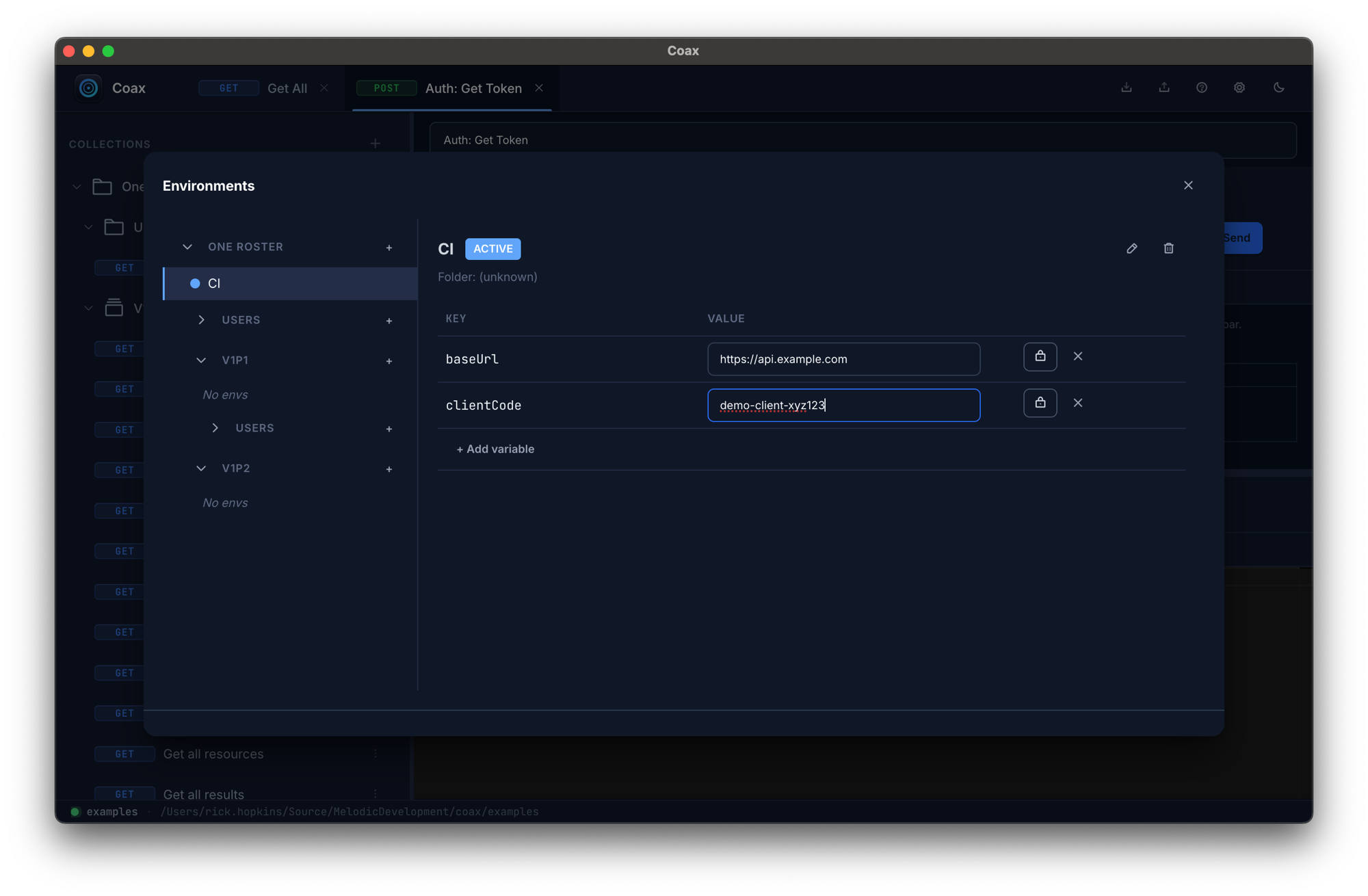
Switch environments with one click
Layered scopes: global → collection → folder → request. Deepest wins. Move between dev / staging / prod without touching a config file or restarting anything.
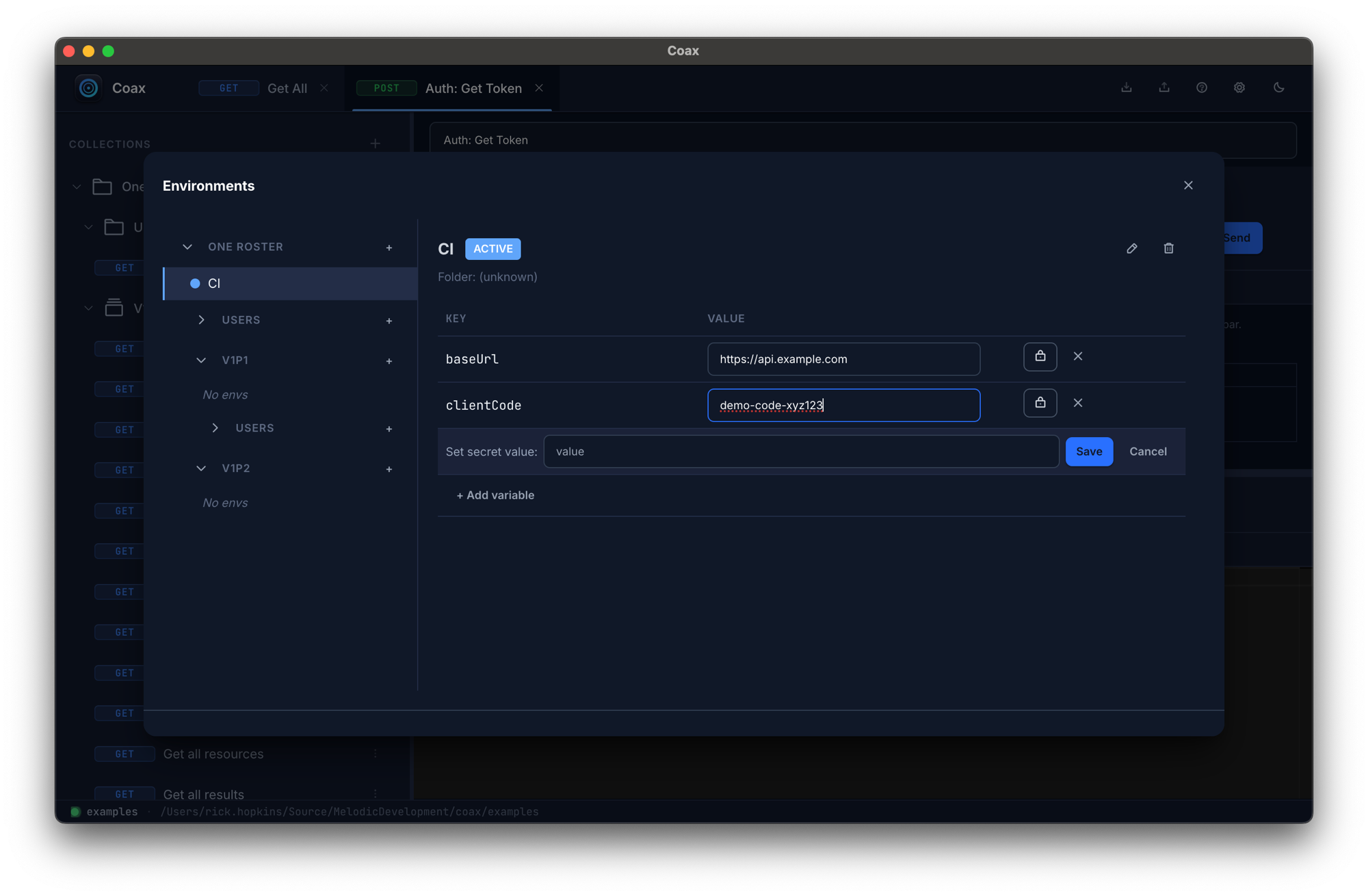
Secrets encrypted at rest
Mark a variable secret and Coax encrypts it with your OS keychain — never
plain text on disk. Export strips secrets to placeholders so you can commit
your .http files safely.
How it compares.
No trash-talking. Each tool is the right pick for someone. Here's where Coax fits.
| Feature | Coax | Postman | Insomnia | Bruno |
|---|---|---|---|---|
| File-based (no cloud account) | ✓ | No | No | ✓ |
Reads .http files natively |
✓ | No | No | Bru format |
| CLI included | ✓ | Newman (paid) | Inso (paid) | ✓ |
| Telemetry default | Off, opt-in | On | On | Off |
| Encrypted secrets at rest | OS keychain | Cloud vault | Cloud vault | Plain text |
| Open source | ✓ MIT | No | Core | ✓ |
| Price | Free (MIT) | Free / $14+ mo | Free / $5+ mo | Free / $2+ mo |
Grab a build and go.
Free, open source, no account. Every feature on every platform — nothing held back, nothing to activate.
Apple Silicon & Intel Macs · Windows 10/11 · Linux (AppImage). Older versions, release notes, and checksums are on GitHub Releases.
Questions, answered.
Will my existing .http files work?
Yes. Coax reads the same .http format that VS Code's REST
Client and JetBrains HTTP Client use — variables, requests, the works.
Drop one in and it opens.
Does it work offline?
Always. The app never phones home — there's nothing to activate and no server to check in with. Your workspace, secrets, and history all live on your machine. No internet required to use it.
What about my data?
Your collections, environments, and responses live in a SQLite database in your OS's app-data directory. Encrypted secrets use the OS keychain. Nothing is uploaded anywhere unless you explicitly opt into crash reporting — and even that strips URLs, tokens, and file content before sending. See the privacy doc for the full list.
Is Coax open source?
Yes — Coax is MIT-licensed and the full source lives on GitHub. Use it, fork it, ship it inside your own tooling. Issues and pull requests are welcome; if you're thinking about a larger change, open an issue first so we can talk it through.
What platforms does Coax run on?
macOS (a universal build covering Apple Silicon and Intel), 64-bit Windows, and Linux as AppImage, x64 and arm64. The Windows installer isn't code-signed yet, so first-time launch will show a SmartScreen warning — click More info → Run anyway to continue.
What if I find a bug?
Open an issue on GitHub with a description and (if possible) the steps to reproduce — that's the fastest path, and it's public so others hit by the same thing can follow along. Prefer email? support@melodic.dev works too. Crash reports from users who've opted in are anonymized and help us fix issues without needing a report — see the privacy doc for what those contain.
Stop fighting your API tool.
Plain-text files. No cloud account. Free and open source, forever.
Download Coax